To Grow Marketing Logo To Grow Marketing Logo
  • Home
  • About
  • Services
    • Marketing Audit & Consultation
    • Social Media Marketing
    • Pay per click
    • Content Marketing
    • Search Engine Optimization
  • Blog
  • Contact
  • Courses
To Grow Marketing Logo
  • Home
  • About
  • Services
    • Marketing Audit & Consultation
    • Social Media Marketing
    • Pay per click
    • Content Marketing
    • Search Engine Optimization
  • Blog
  • Contact
  • Courses
To Grow Marketing Logo
  • Home
  • About
  • Services
    • Marketing Audit & Consultation
    • Social Media Marketing
    • Pay per click
    • Content Marketing
    • Search Engine Optimization
  • Blog
  • Contact
  • Courses

How to Design a Business Catalogue for Customers in Digital Marketing

  • Home
  • Uncategorized
  • How to Design a Business Catalogue for Customers in Digital Marketing
How to Design a Business Catalogue for Customers in Digital Marketing
  • June 6, 2025
  • by Ramba Surendar
  • Uncategorized
  • 0 Comments

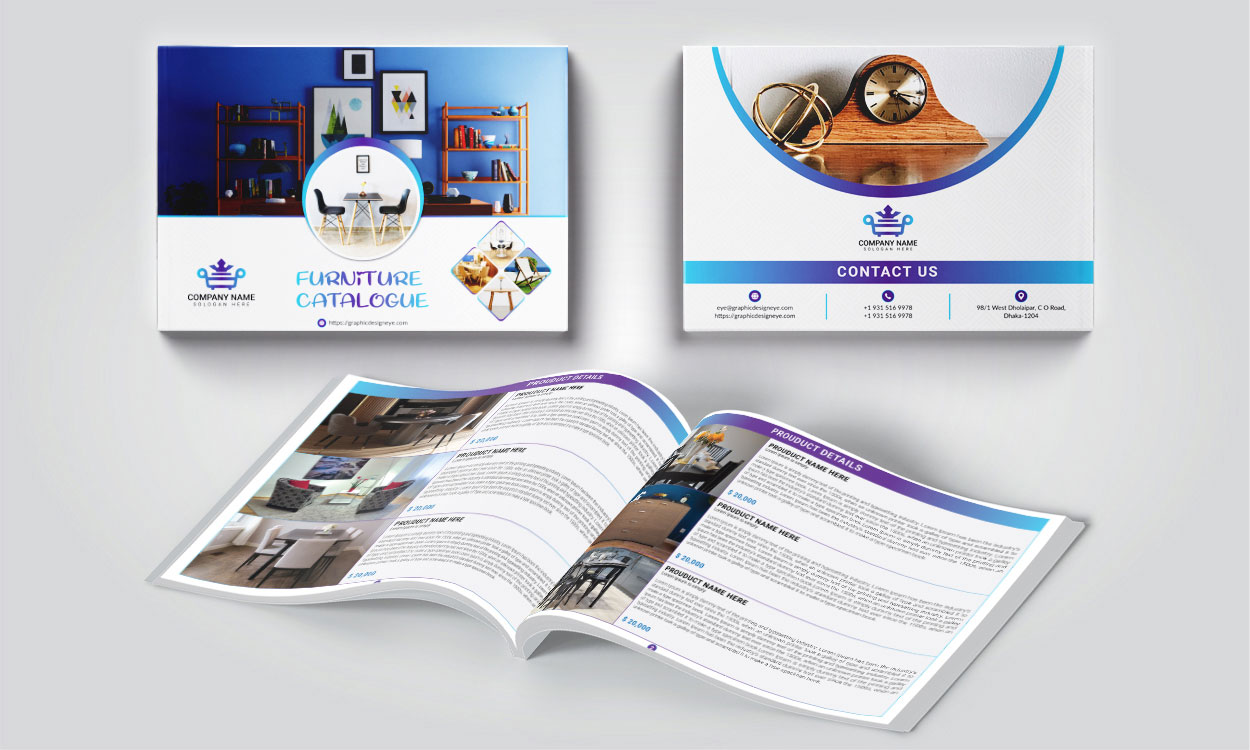
In today’s digital-first world, a well-designed business catalogue is more than just a product listing—it’s a powerful marketing tool. Whether you’re in e-commerce, B2B services, or a creative industry, your catalogue can educate, persuade, and convert prospects into loyal customers.

Here’s a step-by-step guide to designing a customer-focused digital catalogue that works for modern marketing.

🎯 1. Define the Purpose and Audience

Before you start designing, ask:

  • What is the goal of this catalogue? (sales, lead generation, awareness?)
  • Who will be reading it? (B2B clients, retail customers, partners?)

This helps you decide on the tone, design, layout, and even the platform (PDF, webpage, flipbook, etc.).

🖼️ 2. Choose the Right Format

Depending on how your customers will access the catalogue:

  • PDF: Good for email marketing, downloadable content.
  • Interactive Flipbook: Engaging and dynamic for web embeds.
  • Website Page: SEO-friendly and mobile-responsive.
  • E-commerce Catalogues: Use platforms like Shopify, WooCommerce, or HubSpot CMS.

Make sure it is mobile-friendly and fast-loading.

🖋️ 3. Create a Strong Brand Identity

Use consistent:

  • Logo, Colors, Fonts
  • Voice and Style
  • Design elements (icons, illustrations, etc.)

A branded catalogue increases recognition and builds trust.

🛍️ 4. Showcase Products or Services Clearly

For each item/service, include:

  • High-quality images
  • Short but clear descriptions
  • Benefits, not just features
  • Pricing (if applicable)
  • Call to Action (CTA) like “Inquire Now” or “Shop Online”

💡 Tip: Group products into categories to improve readability.

🎨 5. Invest in Design and Layout

Good design keeps your customers engaged. Focus on:

  • Clean, uncluttered pages
  • Consistent grid structure
  • Readable fonts
  • Visual hierarchy (headings, subheadings, bullet points)

Tools like Canva, Adobe InDesign, or Figma can help non-designers create pro-quality layouts.

🔗 6. Make It Interactive (If Digital)

  • Clickable CTAs
  • Links to your website or product pages
  • Embedded videos or animations
  • Contact forms

An interactive catalogue boosts engagement and drives conversions.

📈 7. Optimize for Marketing Channels

Once designed, integrate your catalogue into your digital marketing:

  • Embed it on your website
  • Share on social media
  • Include it in email campaigns
  • Use as a lead magnet with gated downloads
  • Link it in Google Ads or social campaigns

🔄 8. Update Regularly

Outdated catalogues can hurt your brand. Make sure to:

  • Refresh products/services
  • Add new testimonials or case studies
  • Update pricing and offers

Set a schedule to revise it quarterly or biannually.

📊 9. Track Performance

Use tools like:

  • Google Analytics (for catalogue web pages)
  • Heatmaps (for interactive versions)
  • UTM links (to measure clicks and engagement)

Understand what’s working and improve the next edition.

✅ Final Thoughts

Your digital business catalogue is often the first impression potential customers get. A smart design combined with strong content can drive results across your digital marketing efforts.

💬 Ready to design yours? Whether you’re starting from scratch or revamping an old catalogue, these tips will ensure it’s impactful, attractive, and customer-centric
Previous

Programmatic SEO: What It Is and How to Use It

Next

Technical SEO 101: What It Is and Why It Matters

Leave a Comment Cancel reply

Your email address will not be published. Required fields are marked *

Categories

  • ai (32)
  • Business (33)
  • Content (39)
  • design (30)
  • Paid Media (25)
  • SEO (89)
  • Uncategorized (23)

Recent Posts

SEO vs Paid Ads: Which Works Better for New Businesses?
January 18, 2026
SEO vs Paid Ads: Which Works
A conceptual illustration showing a balance scale weighing AI technology against human ethics, symbolizing the importance of trust and transparency in modern marketing.
January 9, 2026
Ethics of AI in Marketing: What
Illustration showing common technical SEO mistakes like slow page speed, mobile optimization issues, broken links, and robots.txt errors that hurt website search rankings
January 8, 2026
Technical SEO Mistakes Hurting Your Rankings
How AI Tools Are Transforming Digital Marketing Workflows
December 30, 2025
How AI Tools Are Transforming Digital
December 29, 2025
Using GPT-Style AI to Scale Content

Archives

  • January 2026
  • December 2025
  • November 2025
  • October 2025
  • September 2025
  • August 2025
  • July 2025
  • June 2025
  • May 2025
  • February 2025
  • August 2019

Tags

#MobileSEO #SEOMistakes #DigitalMarketing #MetaTags #HyperlinkBestPractices #MobileOptimization 2025 Marketing Trends AdTech2025 AIPaidAds Analysis Analytics Artificial Intelligence B2B Marketing B2C Marketing Best Digital Marketing Certifications Career in Digital Marketing color choices in branding Color Psychology in Digital Marketing Content Creation Data Tracking Digital Marketing Digital Marketing 2025 Digital Marketing Career Digital Marketing India DigitalMarketingIndia Digital Marketing Safety Digital Marketing Tools digitalmediaROI Freelance Digital Marketing GA4 Google Ads Google Analytics Google search trends Google Tag Manager importance of colors in marketing India2025 influencer marketing Local SEO LocalSEO marketing tool Meta Ads On-Page SEO Online Ads PaidAds Regional Ads SEO SEO 2025 SmallBiz WebTracking zero-click searches
  • shape1
  • shape2
  • shape3
  • shape4
  • shape5
  • shape6
  • shape7

Newsletter SignUp!

    At To Grow Marketing, we understand that today's audience is fast-paced and easily distracted. That’s why we craft simple, engaging, and results-driven marketing strategies that blend creativity with functionality to drive real growth.

    Services

    • Marketing Audit & Consultation
    • Social Media Marketing
    • Pay Per Click
    • Content Marketing
    • Search Engine Optimization

    Office Address

    • Kamaraja Nagar, Avadi
    • +91-7200070191
    • togrowmarketing@gmail.com
    © Copyright To Grow Marketing 2025. Designed and Developed by RadiusTheme
    To Grow Marketing Logo
    • Home
    • About
    • Services
      • Marketing Audit & Consultation
      • Social Media Marketing
      • Pay per click
      • Content Marketing
      • Search Engine Optimization
    • Blog
    • Contact
    • Courses
    Follow Us
    To Grow Marketing Logo
    Dec 21 - DM Course - Rs. 99
    • Home
      • Home 2
      • Home 3
    • About
      • About Us
      • About Us 2
    • Case Study
      • Case Study 1
      • Case Study 2
      • Case Study 3
      • Case Study 4
      • Case Study 5
    • Elements
      • Blog
        • Blog Post 1
        • Blog Post 2
        • Blog Post 3
        • Blog Post 4
        • Blog Post 5
        • Blog Post 6
      • Service
        • Courses
        • Service Gallery 2
        • Service Gallery 3
        • Service Gallery 4
        • Service Gallery 5
      • Team
        • Team Gallery 1
        • Team Gallery 2
        • Team Gallery 3
      • Testimonial
        • Testimonial – 1
        • Testimonial – 2
        • Testimonial – 3
      • Contact Info Box
        • Contact Info Box 1
        • Contact Info Box 2
      • Info Box
        • Info Box 1
        • Info Box 2
        • Info Box 3
      • Miscellaneous
        • Brand Showcase
        • Counter 1
        • Progress Bar
        • Progress Box Image
        • Radius Button
        • Section Title Subtitle
      • Pricing
        • Pricing Plan 1
        • Pricing Plan 2
        • Pricing Plan 3
        • Pricing Plan 4
        • Pricing Plan 5
    • Pages
      • Service
        • Service Archive
        • Single Service
      • Case Study
        • Case Study Archive
        • Single Case Study 2
        • Single Case Study 3
      • Team
        • Team Gallery 1
        • Team Gallery 2
        • Team Gallery 3
      • Typography
      • 404 Error
    • Blog
      • Blog 1
      • Blog 2
      • Blog 3
      • Single Blog Post
    • Contact
    Follow Us